BLOG
CurieOS cuts fan system effect calculations from days to 15 minutes
October 26, 2026 · Dilbag Singh Gill and Tony Hall

A fan rarely performs inside a cooling unit the way it did in the lab. We built our own application in CurieOS to turn a days-long airside pressure calculation into a 15-minute run.
Every fan comes with a performance rating measured in a lab, where air flows in smoothly and leaves with nothing in its way. Inside real equipment, like the cooling units that keep a data center's servers from overheating, the fan is boxed in by coils, drain pans, and sheet metal, and it can't deliver what its rating promises. Engineers call that shortfall system effect: the pressure penalty for installing a fan differently than it was tested. If it's not accounted for in the design, the fan either moves less cooling air than designed or burns extra electricity for the life of the unit. Calculating it properly for a specific unit takes a specialist working through it plane by plane, which on units like this has taken us a few days by hand. To save time, it's usually covered with a rule-of-thumb allowance instead.
On a recent design for a 10,000 cfm (cubic feet per minute) computer room air handler (CRAH), we ran the full calculation through an application we built in CurieOS for exactly this job. Working from the layout drawings, it traced every point where the air changes speed or direction, added up the losses through the cabinet, and applied the industry-standard AMCA 201 loss factors. The run took under 15 minutes, and each step is laid out below. The fan could then be selected against a calculated system effect rather than an allowance.
We built that application ourselves for this one calculation, and that's the purpose of CurieOS: engineers can build their own applications for whatever work their team does. That might be a single calculation like this one, a design check, or a dashboard set up around how a team already runs a project, for any team or workflow. Every calculation can also be exported into the software engineers already use, so anyone can check the numbers for themselves.
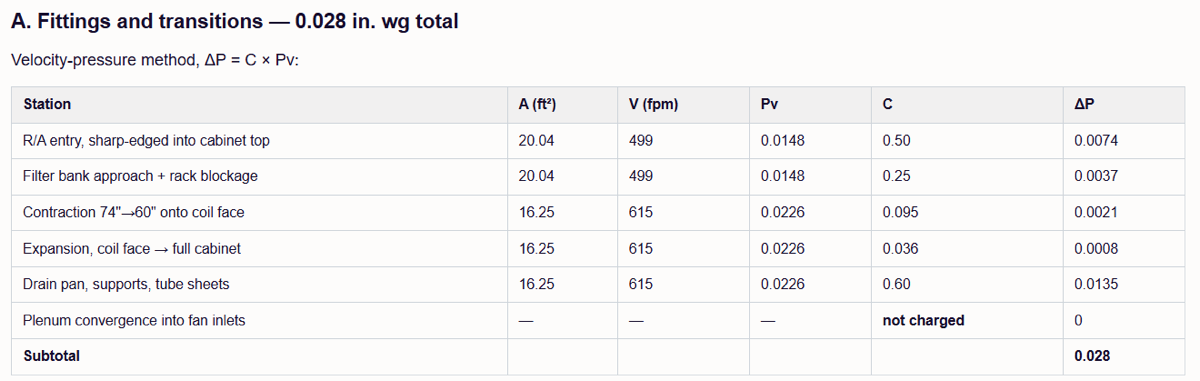
Output from our system effect application in CurieOS, showing the pressure lost at each point inside the cabinet.
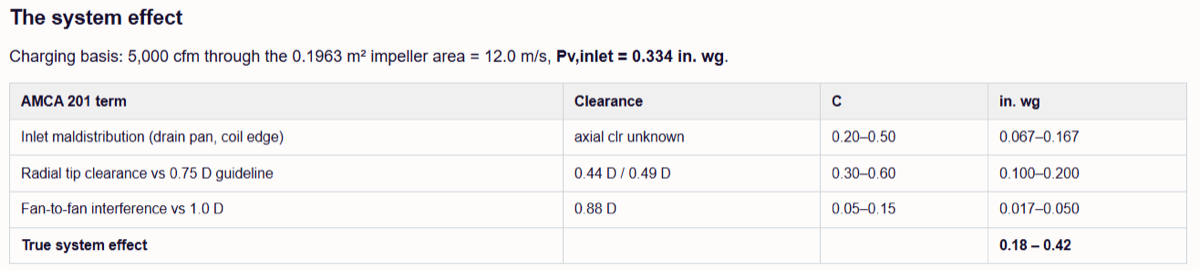
Output from our system effect application in CurieOS, showing each system effect penalty from AMCA 201, added up.
The calculation that usually gets estimated
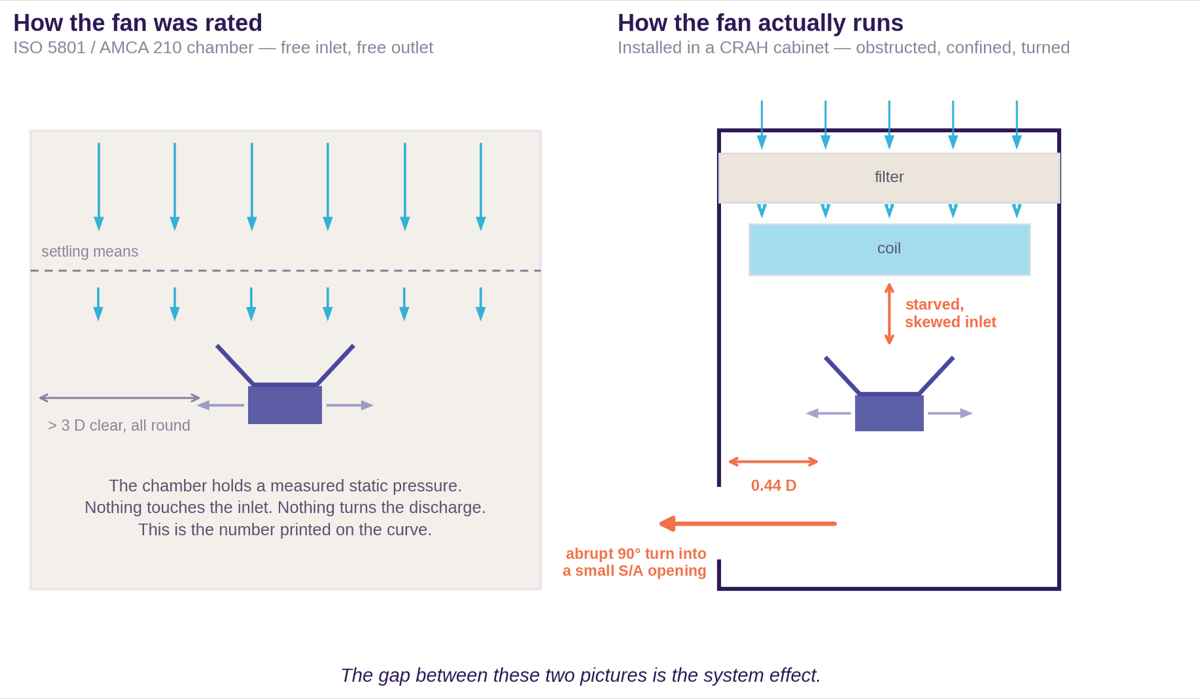
These diagrams are also outputs from our system effect application in CurieOS, showing fan as tested versus fan as installed.
Manufacturers measure fan performance in a test chamber, under standards like ISO 5801 or AMCA 210, that's built to make the fan perform as well as physics allows. Flow arrives through settling screens as a uniform, swirl-free column, nothing sits within a few diameters of the inlet, and the discharge is unobstructed. Each test records how much air the fan moves against a set resistance, and those readings make up the published performance curve.
Now install the same fan in a typical downflow, front-discharge CRAH. The inlet sits under a coil, a drain pan hangs directly above it, and the impeller tip is a few inches from a sheet-metal wall. The discharge has to turn 90 degrees and squeeze through an opening half the size of the chamber it just filled. The fan hasn't changed, but the air approaching and leaving it has. Uneven air coming in, leftover swirl, and a cramped outlet all mean the fan can't push as hard as it did in the test.
AMCA Publication 201, Fans and Systems, gives each of those penalties a number, called a system effect factor, which is multiplied by how fast the air is moving at a specific point. Two rules make it easy to get wrong:
- System effect is charged to the fan's required pressure, never to the duct calculation. An engineer who calculates duct losses carefully and skips this step still ends up with a problem when the unit is tested on site.
- Every factor is tied to air speed, and the penalty grows with the square of that speed, so doubling the speed quadruples the loss. That hits small fans in tight cabinets hardest.
The slow part is that the work never carries over. Each cabinet has a different layout, so the engineer has to find every point where the air speeds up, slows down, or turns, and work out the loss at each one using the air speed at the right point and correcting for air density. The entire process also has to start again whenever the coil, fan, or cabinet changes.
What an estimate costs
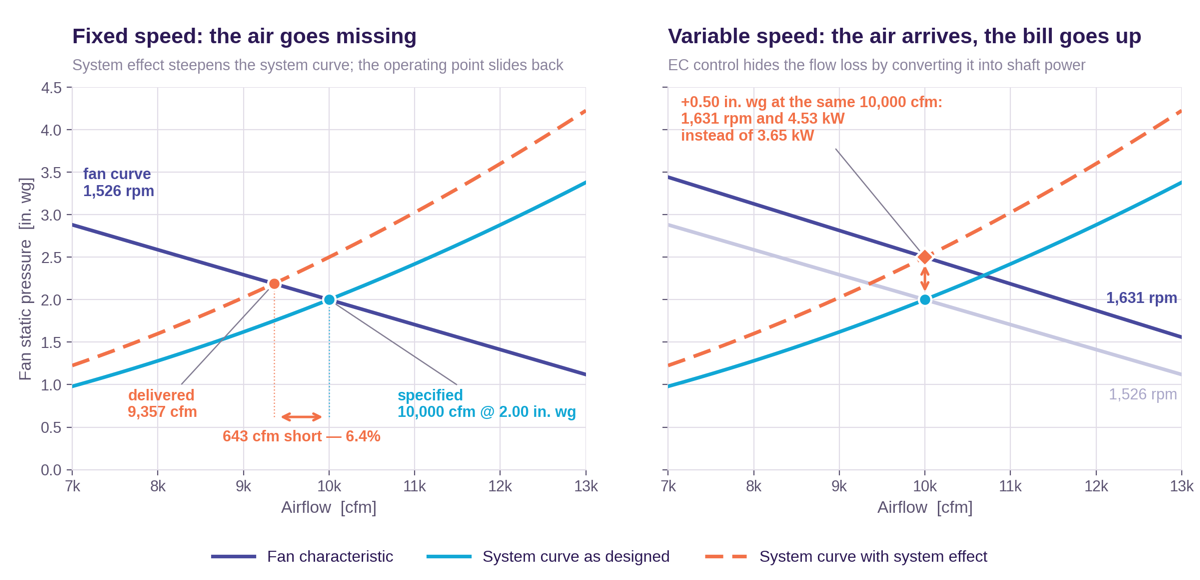
Output from our system effect application in CurieOS, showing operating point shift for fixed-speed and variable-speed fans.
A missed system effect means the fan is working against more resistance than the design assumed. On a fan chart, that makes the real system curve steeper than the one you designed to, and what happens next depends on whether the fan can change speed.
A fixed-speed fan loses air. It can't push harder, so it moves less air instead, and the operating point slides back down the fan curve to the new intersection. On the CRAH above, 0.50 in. wg (inches of water gauge, the standard unit for fan pressure) of unaccounted pressure moves the 10,000 cfm selection to 9,357 cfm. That 6.4% shortfall shows up as a warm aisle rather than a fan alarm.
A variable-speed fan loses money. An EC (electronically commutated) or inverter-driven fan speeds up until it recovers design flow, so the air arrives and nobody notices anything wrong. But the same 0.50 in. wg requires an additional 105 rpm and 0.88 kW, for the lifetime of the unit.
As more units move to EC plug fans, system effect no longer shows up as an airflow complaint during commissioning. It hides in the electrical bill, where only a careful power measurement against the manufacturer's submitted figures will find it. And in a data center, the penalty is multiplied across hundreds or thousands of CRAHs, fan walls, and rear-door heat exchangers, all running continuously.
Take a 100 MW facility cooled entirely by units like the one above. At a 20°F air temperature rise, each 10,000 cfm CRAH removes about 63 kW, so the site needs roughly 1,600 of them. If every unit carries the same 0.88 kW penalty, that's about 1.4 MW of extra fan power running around the clock: roughly 12 GWh a year, around $1 million at $0.08/kWh, and about 0.014 added to the site's PUE (power usage effectiveness, the standard measure of how efficiently a data center uses energy).
On a site that size, running the full stack through the application before the fan is selected catches the penalty while the design can still change.
Inside the 15-minute run
Every loss in this calculation follows the same principle: the faster air moves through a point, the more pressure it loses there. Velocity pressure is how engineers express that speed as a pressure, and every system effect factor and cabinet fitting loss is a multiple of it:

C is a dimensionless loss coefficient, and pᵥ is the velocity pressure at the reference plane for that particular effect. Velocity pressure in inches of water gauge, from velocity in feet per minute, is:
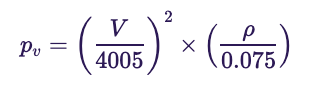
The application runs these as defined calculations, so a rerun with the same inputs returns the same answer. On the CRAH, it worked through the same sequence an engineer would by hand, in minutes rather than days:
- Establish the duty from the layout drawings: volume flow, density, and the geometry of every plane where air changes speed or direction.
- Compute the velocity pressure at each reference plane.
- Build the cabinet loss chain station by station: the return opening, the filter rack intake, the transition onto the coil face, the drain pan and supports, and the discharge opening.
- Identify which AMCA 201 system effect conditions apply, and assign a coefficient to each.
- Add the system effect to the fan's required pressure, not to the duct calculation.
- Solve for the new speed and power, since the fan has a drive.
- Check the result against the fan's ceiling at design flow.
Every line of the output shows the coefficient, the reference plane, and the raw input it came from, and any assumption is marked as one. The full calculation exports to familiar software like Excel, so a reviewer can verify every number independently instead of taking it on trust. That meant our review could go straight to the three places where hand calculations usually go wrong. In each case, the output matched what we'd have done by hand.
Reference planes. Each loss calculation involves determining the average airspeed at a specific cabinet cross-section and applying the appropriate loss coefficient, which makes the choice of reference plane critical. For example: inlet system effects are charged against the velocity pressure at the fan inlet, and discharge system effects are charged against the velocity pressure at the fan discharge. However, these calculations are cumbersome as the engineer progresses through the system. Determining velocity pressure based on the correct reference plane requires measuring the appropriate cross-sectional area to find the accurate velocity and selecting the correct loss coefficient from AMCA 201. This is where most of the engineer's time is spent.
Double-counting. Cabinet losses are real pressure drops in the air path and belong in the static pressure calculation like any duct fitting, separate from system effect. The convergence of air from the fan plenum into the inlet cone looks like a contraction you should charge for. But the same acceleration happens inside the AMCA 210 test chamber, so it's already in the rated static pressure.
Density. Fan ratings assume standard air, but design engineers frequently select fans at a different density based on the application. The fan on this CRAH was selected at 1.15 kg/m³ (0.0718 lb/ft³), about 4% below standard air, which shifts every pressure and power number by the same 4%.
All three were laid out line by line in the application's output, so confirming them didn't mean redoing the calculation.
The engineer makes the call
We built the application in CurieOS so we'd never have to take its output on faith. On this CRAH, that meant our time went on judgment rather than arithmetic: we set the design duty, decided whether each system effect condition applied to this cabinet, and tested the assumptions the application flagged against what we knew about the unit.
Because the calculation is defined once in the application, a changed coil selection or fan doesn't mean starting over. We update the input, the application reruns the chain, and the review picks up from the new result.
Most engineering teams have calculations like this one: well understood, tedious by hand, and repeated every time the design changes. With CurieOS, any team can build their own application for that work, whether it's a CRAH, a cooling tower, a duct system, smoke control, or a workflow that has nothing to do with fans. Every calculation exports to the software the team already uses, so engineers can check the numbers independently of the AI, in tools they already trust. If your team has a calculation that takes up engineering hours, you can get in touch through our CurieOS page.